
MirrorAPP+
Gigaboyz.com LIMITEDAuto & Vehicles
3.130.00 Reviews
- Version
- 2.5.14
- Installs
- 50.00K
- Age Rating
- Everyone
Screenshots
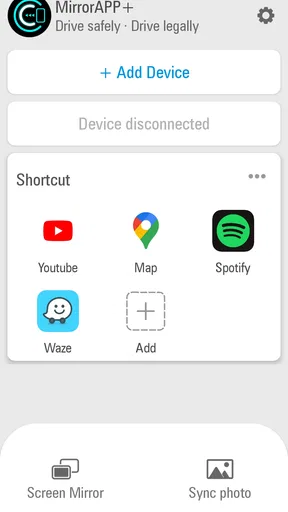
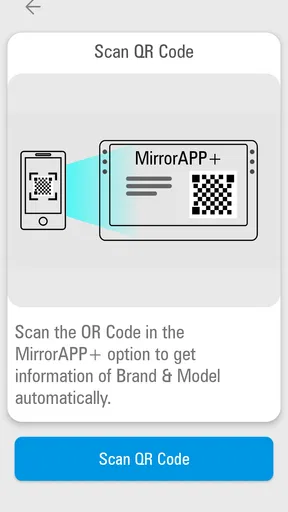
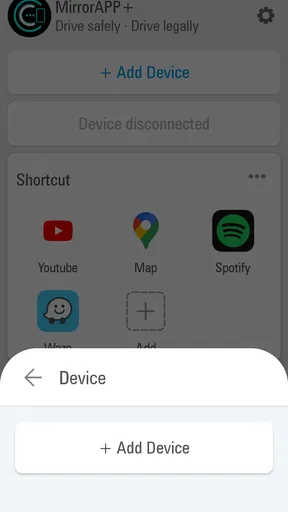
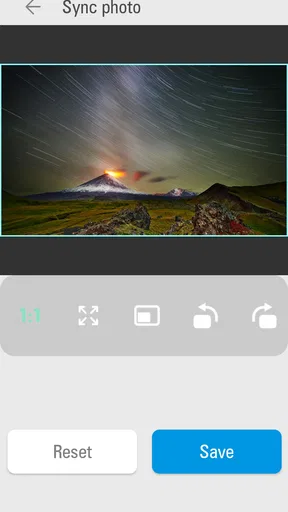
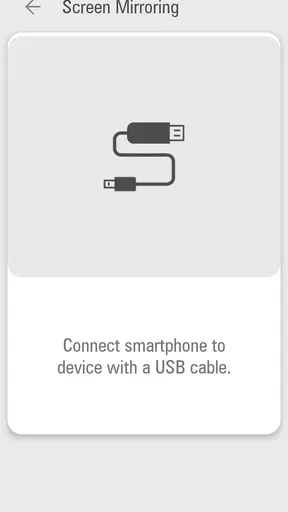
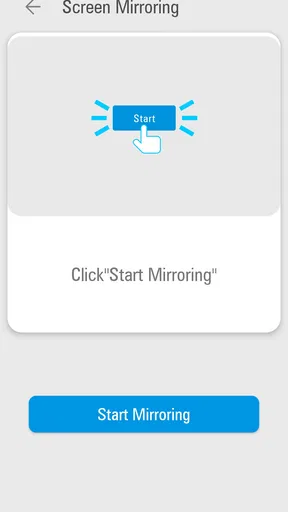
Our Review of MirrorAPP+
 Analysis by Appyee
I tested MirrorAPP+ as a driving-focused utility rather than treating it like a general entertainment app. Its purpose is easy to understand: it is meant to sit alongside your time on the road and make the driving experience more convenient through a phone-based companion. That sounds simple, but apps in this space succeed or fail on practical details—how quickly they open, whether the interface is easy to read, and whether they reduce distractions instead of adding another screen to manage.
My overall impression is mixed but useful. MirrorAPP+ can appeal to drivers who want a dedicated companion for everyday trips and who are comfortable checking whether it fits their particular phone-and-car setup. It is free, rated for Everyone, and has attracted over 50 thousand installs, so it is accessible enough to try without making a financial commitment. At the same time, its average rating of 3.1 from more than 200 ratings suggests that the experience is not equally smooth for everyone. I would approach it as a practical tool worth testing, not as an automatic replacement for every built-in vehicle system.
How MirrorAPP+ feels in everyday driving
The app belongs to the Auto & Vehicles category, and that context matters. I would not install it simply because I wanted another navigation app or a prettier dashboard. Its value depends on whether it fits a specific driving routine: commuting, making short local trips, preparing the phone before setting off, or using a vehicle that does not offer the same level of connected convenience as a newer model.
The best way to judge it is to think about the moment before a journey. I can imagine placing the phone in its usual mount, opening the app while parked, and checking that the display is ready before moving. That small preparation step is more important than it sounds. A driving companion should be configured before the car is in motion, because searching through menus at a red light or while driving defeats the point of having a focused automotive interface.
For a weekday commute, the useful workflow is likely to be repeatability rather than excitement. I would keep the phone in the same position, open MirrorAPP+ before leaving, and avoid changing settings once the trip begins. This makes the app easier to live with than a tool that requires constant adjustment. If your routine changes often, however, the convenience may be less obvious. Drivers who switch between several cars, mounts, or phones may spend more time checking compatibility and positioning than they would with a vehicle’s integrated controls.
One practical tip is to evaluate the app during a stationary setup session rather than during a real journey. Sit in the parked car, place the phone where you can see it without blocking your view, and walk through the main controls. This reveals whether the text and controls suit your eyesight and driving posture. It also lets you decide whether the app is genuinely reducing effort. If the setup already feels fiddly while parked, it is unlikely to become pleasant once traffic, weather, and navigation demands are added.
Who is most likely to benefit
I see the strongest fit for drivers who want a phone-centered companion and do not expect the app to transform an older vehicle into a fully integrated modern cockpit. It may also suit someone who prefers having one familiar driving screen instead of moving between unrelated phone apps. The free entry point makes experimentation straightforward, especially if you can test it without changing your existing routine.
It is less convincing for drivers who already have a polished built-in infotainment system and are satisfied with it. In that situation, adding another layer can create duplication: one screen in the vehicle, another on the phone, and extra decisions about which system should handle each task. I would also be cautious if you need a solution that is completely hands-off. A phone app can be useful, but it still depends on the phone, its placement, and the driver’s discipline before the car moves.
New drivers should think about distraction as well as convenience. Even a well-designed automotive app can become unsafe if it encourages frequent tapping. I would set it up before departure, use voice or steering-wheel controls where available through the surrounding setup, and stop somewhere safe if a change is necessary. MirrorAPP+ should support a driving routine, not become the routine.
What the current version tells me
The current version is 2.5.14, and that is meaningful because it shows the app is not sitting at an untouched first release. MirrorAPP+ was released on September 2, 2019, so it has had time to move beyond its original launch state. I would therefore expect the present build to represent an ongoing product rather than a one-off experiment, while still judging it by what works on my own phone and vehicle combination.
The developer, Gigaboyz.com LIMITED, has kept the app available across a broad range of devices, with a minimum operating-system requirement of Android 7.0. That makes it approachable for people using older Android hardware, although age alone does not guarantee a perfect experience. A phone that technically meets the requirement may still differ in screen size, performance, connection behavior, or display brightness. For a driving tool, those differences matter more than they would in a casual app.
I would not read the version number as proof that every possible issue has been solved. Product evolution can mean refinements, compatibility work, or adjustments that are invisible until a particular driver uses a particular setup. The sensible approach is to install it before relying on it for an important trip. Give yourself time to learn the interface, confirm that it behaves consistently, and remove it if it makes your preparation more complicated.
How existing users may experience the evolution
Someone who used an earlier build may notice that the present release feels more like a maintained utility than a launch demonstration, but the important question is whether daily friction has actually fallen. Existing users should pay attention to the small moments: how quickly the app becomes usable, whether the layout remains readable from the driver’s seat, and whether returning to the app after another phone task feels predictable.
My advice for an established user is not to change everything at once. Keep the same phone position and driving routine, then compare how the current build handles the tasks you already perform. This gives you a clearer sense of improvement than judging it from the version label alone. If you rely on a particular workflow, test that workflow while parked before updating your normal habits.
There is also a trade-off for people using older devices. A lower minimum operating-system requirement can make an app available to more drivers, but older phones may have slower startup or less comfortable displays. If MirrorAPP+ feels delayed, cramped, or difficult to read, upgrading the phone may help, but that is a hardware decision rather than something the app itself can guarantee. I would not compromise visibility just to keep using a familiar tool.
Where it sits beside the usual alternatives
The obvious alternative is the vehicle’s own infotainment system. Built-in systems usually have the advantage of being designed around the car’s controls and display, which can make them feel more integrated. MirrorAPP+ has a different appeal: it can be tried independently and may be useful when the built-in experience is limited, outdated, or simply not the driver’s preferred arrangement.
Another alternative is using separate phone apps for navigation, music, calls, and vehicle-related information. That approach can be flexible, but it often creates a scattered experience. MirrorAPP+ is more attractive when you want a single driving-oriented starting point rather than repeatedly opening unrelated apps. The trade-off is that a focused companion is only valuable if its own interface is easier to manage than the separate tools it replaces.
I would choose a familiar navigation app instead when route guidance is the only thing I need and it already works reliably in my car. I would choose the built-in system when integration with the vehicle is the priority. MirrorAPP+ makes the most sense in the middle: for someone looking for a dedicated phone-based driving companion, willing to test the setup, and not expecting it to reproduce every function of a factory-installed system.
Small workflow lessons that matter
The first non-obvious lesson is to treat mounting position as part of the app setup. A screen that looks comfortable in your hand may be too low, too reflective, or too far from your natural line of sight in the car. I would test it from the driver’s seat in daylight and at night while parked. If you need to lean forward to read it, the problem is not solved by a more attractive interface.
The second is to create a “before driving” checklist. Open the app, secure the phone, confirm the intended mode, and then leave the screen alone. This is more reliable than improvising after the journey has started. It also helps identify whether MirrorAPP+ is saving time or merely moving setup tasks from the car’s dashboard to the phone.
The third is to judge it over different kinds of trips. A short familiar drive tests convenience, while a longer journey tests whether the app remains comfortable and whether you can ignore it when you do not need it. Rain, bright sunlight, unfamiliar roads, and stop-and-go traffic all change how much attention a screen demands. A tool that feels fine in a quiet parking area may not be the right choice for a demanding route.
A fourth useful habit is to keep an alternative ready during the trial period. I would not delete a trusted navigation or vehicle app immediately. Use MirrorAPP+ alongside your normal option while parked and on low-pressure trips, then decide whether it genuinely improves the experience. This avoids turning an experiment into a problem when you need to get somewhere without delay.
Limitations I would consider before installing
The rating of 3.1, based on more than 200 ratings, is the clearest sign that expectations should be realistic. It does not tell me that the app is unusable, but it does warn me that the experience may depend heavily on the individual device and driving setup. I would pay close attention to stability, readability, and how much manual interaction the app requires in my own car.
The phone-based nature of the product is another limitation. A mounted phone is not the same as a factory display, and drivers have to manage positioning, charging, and safe interaction themselves. Even if the app works correctly, the surrounding setup can still be inconvenient. This is why I would recommend a proper test before trusting it on a long trip or in an unfamiliar area.
I would also skip it if I am looking for a complete answer to every automotive need. MirrorAPP+ is best considered one part of a driving setup. It should not replace sensible preparation, safe mounting, or a dependable backup plan. Drivers who want deep vehicle integration, a large dashboard display, or minimal phone involvement may be happier with built-in equipment or a dedicated aftermarket solution.
What I would watch as the app continues
With version 2.5.14 as the current reference point, I would watch future updates for improvements that affect real driving rather than cosmetic change alone. The most valuable progress would be smoother setup, clearer controls, dependable behavior across different Android phones, and less need for the driver to look away from the road. Those are the areas that determine whether a companion becomes part of a routine.
I would also look for signs that the developer continues to balance older-device access with modern usability. Supporting Android 7.0 broadens the potential audience, but a driving interface still needs to feel comfortable on both compact older screens and newer displays. Good evolution would make the app easier to use without forcing every driver into the newest hardware.
My final view is that MirrorAPP+ is worth a careful trial for drivers who want a free, phone-based automotive companion and are prepared to configure it responsibly. I like the idea of a dedicated driving workspace, and the app’s long presence since 2019 plus its current 2.5.14 release make it more credible than an abandoned experiment. Still, the middling average rating means I would not recommend installing it blindly and relying on it immediately.
If you have a simple daily commute, a suitable phone mount, and a vehicle that leaves you wanting a more focused companion, it may fit well. If your car already handles everything cleanly, or if you dislike managing a phone while driving, the usual built-in alternative is probably better. My recommendation is to test MirrorAPP+ while parked, use it on familiar short trips, and keep it only if it genuinely reduces distraction and preparation time.
Verdict
Strengths of MirrorAPP+
- Simple interface makes mirror controls easy to find.
- Front-camera preview helps with quick appearance checks.
- Useful for applying makeup or adjusting hair on the go.
- Starts quickly without requiring specialized equipment.
- Convenient alternative when no physical mirror is nearby.
Limitations of MirrorAPP+
- Image quality depends heavily on your phone’s front camera.
- Screen glare can make viewing difficult in bright sunlight.
- Extended use may drain the battery noticeably.
- Some features may be limited behind ads or in-app purchases.
- It cannot replace a full-size mirror for checking your outfit.
Similar Picks in This Category
View All
Android Auto
Google LLC4.1

maxim — order a taxi & food
PT. SITO4.7

Штрафы ГИБДД: проверка с фото
Pays LLC – Штрафы ГИБДД4.7

Номерограм – проверка авто
Авто Ассист4.8

Дром Авто
Дром4.9

Frequently Asked Questions
What is MirrorAPP+ and what can I use it for?
MirrorAPP+ is designed to mirror or share content from a mobile device to a compatible larger screen, such as a smart TV, streaming device, computer, or another supported display. Depending on the device and version, it may be useful for viewing photos and videos, presenting documents, browsing, gaming, or watching content on a bigger screen. Available functions can vary according to your phone, operating system, and receiving device.
Is MirrorAPP+ compatible with Android and iPhone devices?
MirrorAPP+ may support Android and iOS devices, but compatibility is not identical across every model. Before downloading, check the app-store listing for the required Android or iOS version and supported connection methods. Some features may depend on Wi-Fi Direct, a shared wireless network, Chromecast, AirPlay, a smart-TV application, or a compatible receiver. Older phones and TVs may offer fewer options.
How do I connect MirrorAPP+ to my TV or another screen?
In most cases, you should connect your phone and the receiving device to the same Wi-Fi network, open MirrorAPP+, and select the TV, computer, streaming device, or receiver shown in the available-devices list. You may need to approve a pairing request or enter a code displayed on the screen. If the device is not detected, confirm that both devices are powered on, nearby, updated, and using the same network.
Does MirrorAPP+ require an internet connection or special hardware?
A stable internet connection is not always required for local screen mirroring, but both devices usually need to communicate through the same wireless network. Some features, content services, advertisements, account functions, or remote connections may require internet access. Compatibility also depends on the receiving hardware. A smart TV, Chromecast-style device, AirPlay-compatible receiver, computer software, or another supported adapter may be necessary.
Why might the mirrored image be delayed, low quality, or disconnected?
Mirroring performance depends heavily on Wi-Fi strength, network traffic, distance from the router, phone performance, screen resolution, and the receiving device. Video may appear delayed during games or fast action, while weak connections can cause stuttering or disconnections. Moving closer to the router, reducing network congestion, closing demanding background apps, updating both devices, and restarting the connection can often improve stability.
